![[DOOR FLIES OPEN]](https://doorfliesopen.com/wp-content/uploads/2015/08/DFO-MC-Patch.png)

As you may remember from Volume 5, I wanted to try the TopTracer setup at the Alhambra Golf Course. On a lazy Saturday, I decided to head back and try my luck.
This time, the range was open and I was happy to see there were several bays available. When I got to the machine where you get your range balls, it didn’t say anything about how the system worked or how you hooked up to it.
I am a stubborn man that refuses to ask strangers questions until he absolutely has to, so I got my bucket, walked to the top tier, and grabbed an empty bay. I figured I’d figure it out.
I actually did!
There was a place for you to put your cell phone and nothing else. I opened the TopTracer app and it asked me if I was at a TopTracer range. Several clicks later, I was connected to the system and was ready to play games.
The purpose was for me to determine my yardages, so I chose “Practice Session”. This then prompted me to choose a club. I did and then nothing happened.
I had no idea what to do next but, since there was nothing else on my screen but a graphic of the range, I thought, “Hey dumbass, why don’t you try hitting the ball?”
I did and then went to my phone to see if anything happened. Miraculously, the ball path was being traced on the graphic of the range!
I have to say that was actually pretty cool! I hit a decent shot, so the flight path looked very nice. Like what you see on YouTube videos.
My plan was to vary my clubs so I wouldn’t hit the same club 10 times in a row. I figured that was close to real-life playing conditions and would give me a more reliable picture of where my skills were.
I went through my bag and pulled out the clubs I hit most often. I’d hit two or three shots on one club and then move to the next one. As I hit, I’d check the phone to see how I did.
Annoyingly, the system lost connection several times, so a bunch of my shots didn’t get recorded. On some, that was a good thing.
Ultimately, the system recorded 84 shots.
Afterwards, I went to the putting green to get some putting practice in. My drill was to start putting from north, south, east, and west of the hole at 1, 2, 3, and then 4 feet out. Then, I moved on to practicing long putts and trying to get the ball in the hole in two putts as much as possible.
There are two great reasons why it’s a good idea to spend a lot of time on the putting green: 1) the basis for success in golf is putting, so improvement in that area will help your overall game and 2) it’s free.
The other added benefit on this particular putting green is that it has a pretty severe slope, so it’s really good for practicing reading the green and gauging your speed.
After about an hour of putting practice, I went back home to see my stats from the range.
I have to say, the system is pretty impressive! I’m going to share with you some screenshots so you can see the type of data that’s available.
At one point during my practice on the range an elderly gentleman started to hit in the bay next to me and was also using the TopTracer. He asked me if I thought the yardages shown in TopTracer were a bit low. It was funny because I’d had the same thought.
He was wearing an Alhambra Golf Course polo and hat, so either he worked for the course or he was a big fan. I chatted with him a bit and found out how the TopTracer system worked.
There are cameras positioned behind the bays that record all activity on the range. Once you select your bay on the app, the system knows which ball is yours. The magic of math and technology does the rest.
He did tell me, though, that because the range has three levels and the cameras are only on the top deck, the system has to accommodate for that. He thought maybe that was why our yardages were low.
I think that makes sense. When we were hitting, our balls were landing at certain areas of the range that had yardage markings. These yardage markings did not correspond to what the system was telling us.
However, we were three stories above the lowest bay, so the markings were actually downhill! It turned out the TopTracer system accounted for that. Pretty slick!
Here are my screenshots. Please take pity on my poor distances.
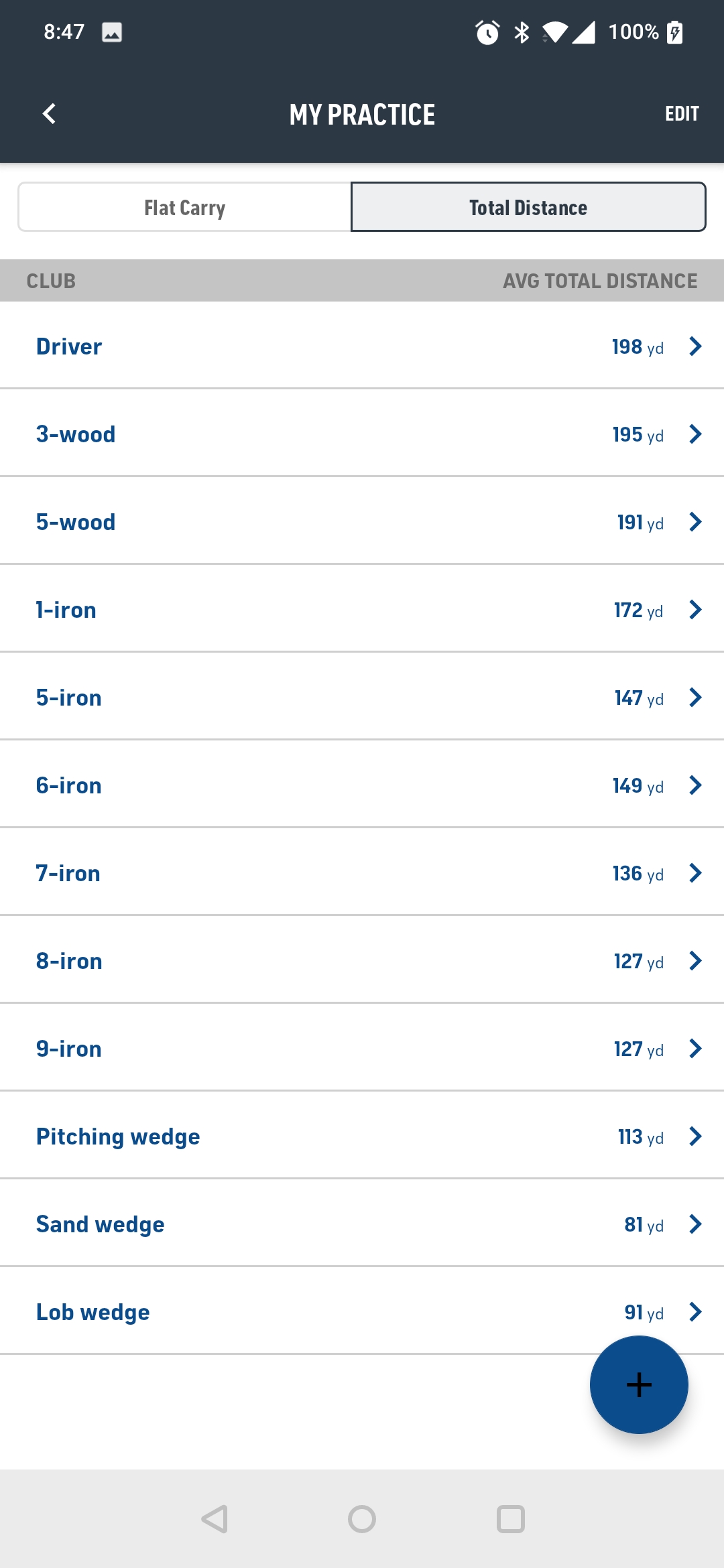
Keep in mind the system allows you to exclude shots from the calculations. I excluded about five shots that were really bad and not reflective of my average.

You can also get detailed stats like this:


The beauty part is that the TopTracer app is free and I didn’t have to pay extra at the range to use the system.
PROS
Got some really valuable data on which are my good clubs and which are my bad clubs
Got in a lot of good practice.
Laughed when I noticed there was one hot lady golfer practicing with her sugar daddy. The dude seriously was twice her age.
CONS
The system disconnected several times, but it did improve as time went on.
I see I have a lot of work to do.
I wasn’t consistent in the number of balls I hit with each club, so I have more data on certain clubs than others.
OVERALL RATING:
I’m really happy about using the TopTracer app and I can’t wait to go back. I’m guessing that’s how TopTracer get their money. They must take a piece of the increased revenue the ranges make from people using the app and coming back for more.

See you next time.





Leave a Reply
You must be logged in to post a comment.